“Test tomorrow” mode. It makes flashcards from your notes, plans your night and quizzes you out loud.
Novu It quizzes you.
A voice assistant for students. Talk to it in Spanish and it studies with you.
Free to use: 10 questions a day, and it never expires. Plus is $249 MXN a month. See pricing
Novu It quizzes you.
A voice assistant for students. Talk to it in Spanish and it studies with you.
Free to use: 10 questions a day, and it never expires. Plus is $249 MXN a month. See pricing
2 months free, no card.
Mac with macOS 13 or later.
Get the highlights.
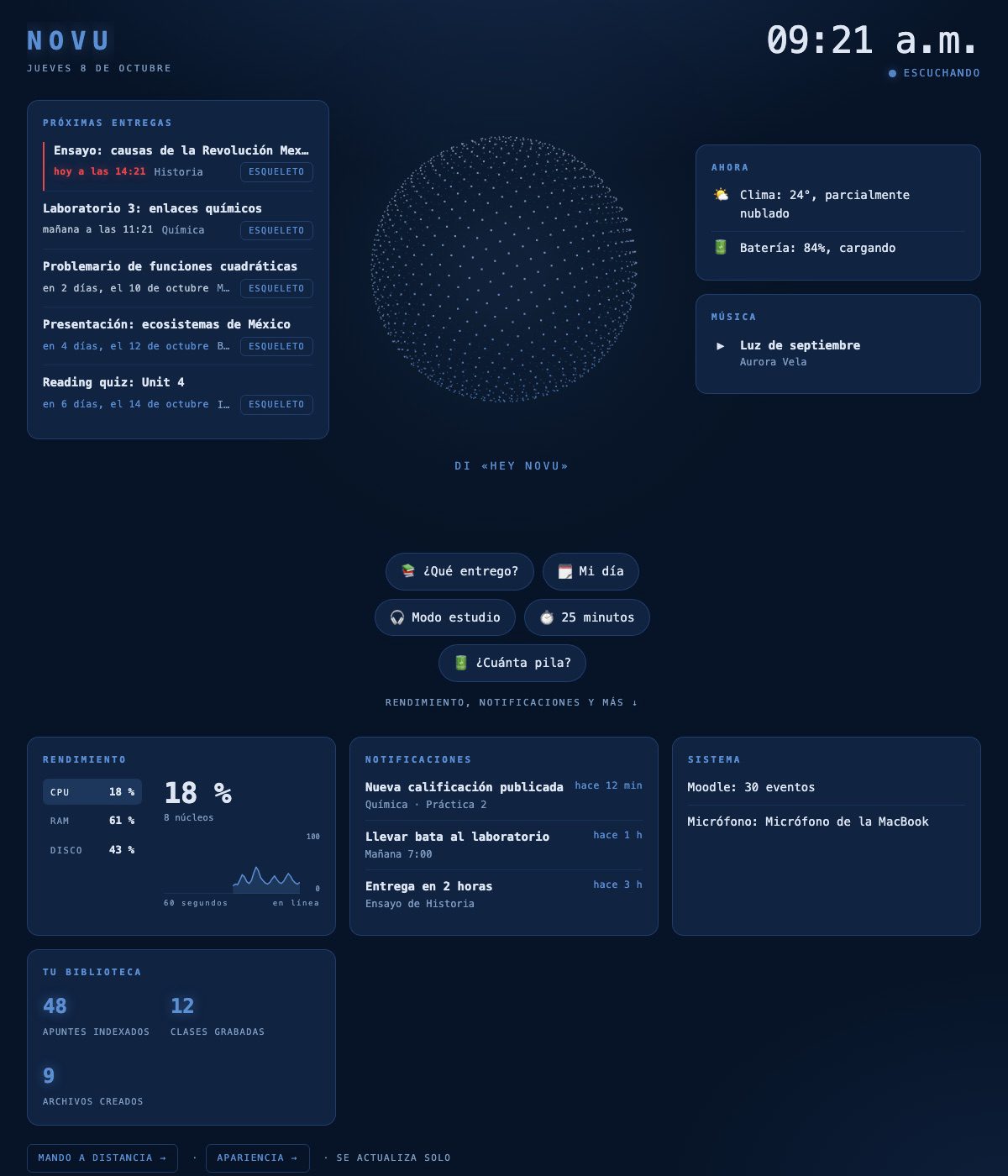
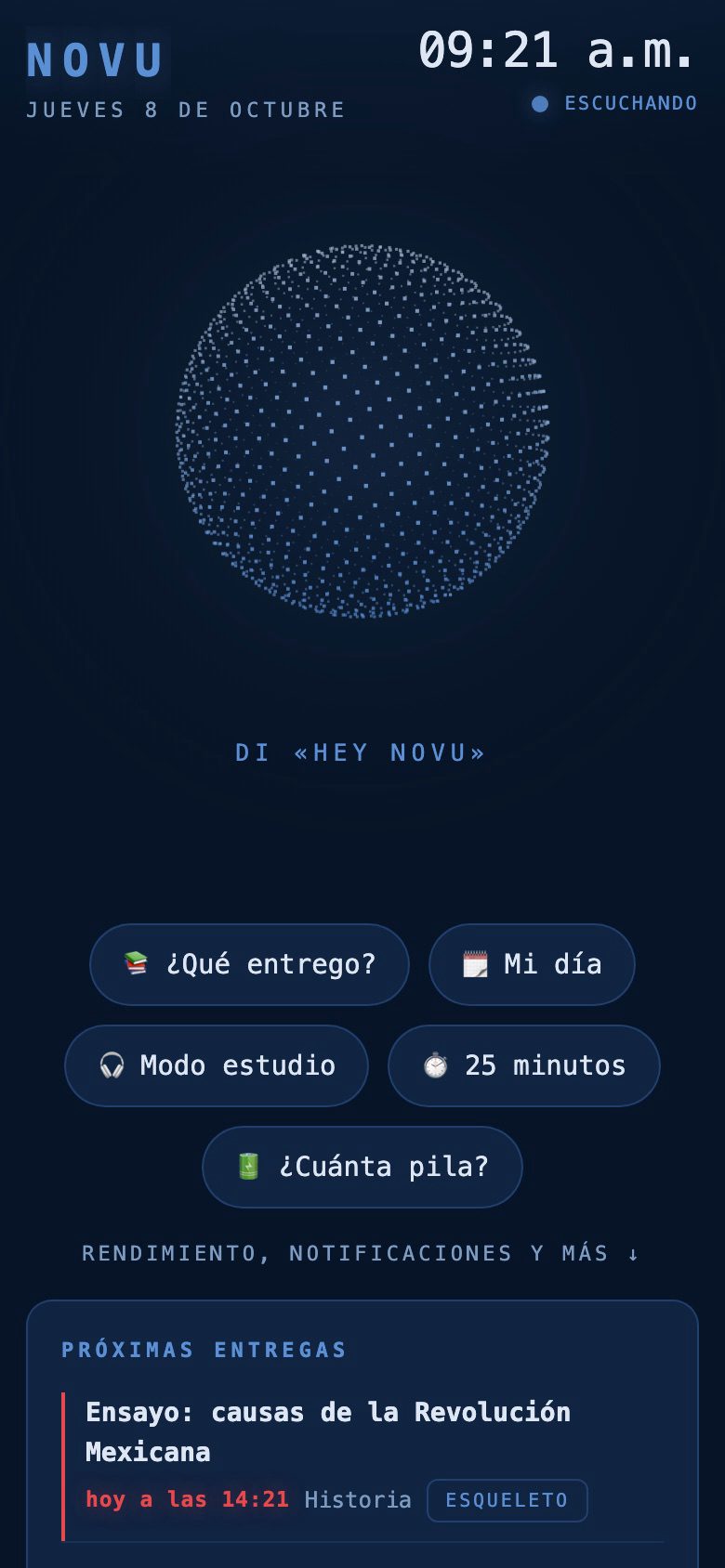
No deadline sneaks up on you. Heads-ups 24 and 2 hours before, from Canvas, Moodle or Classroom.
G
History essayClassroom
M
Lab reportMoodle
C
Physics quizCanvas
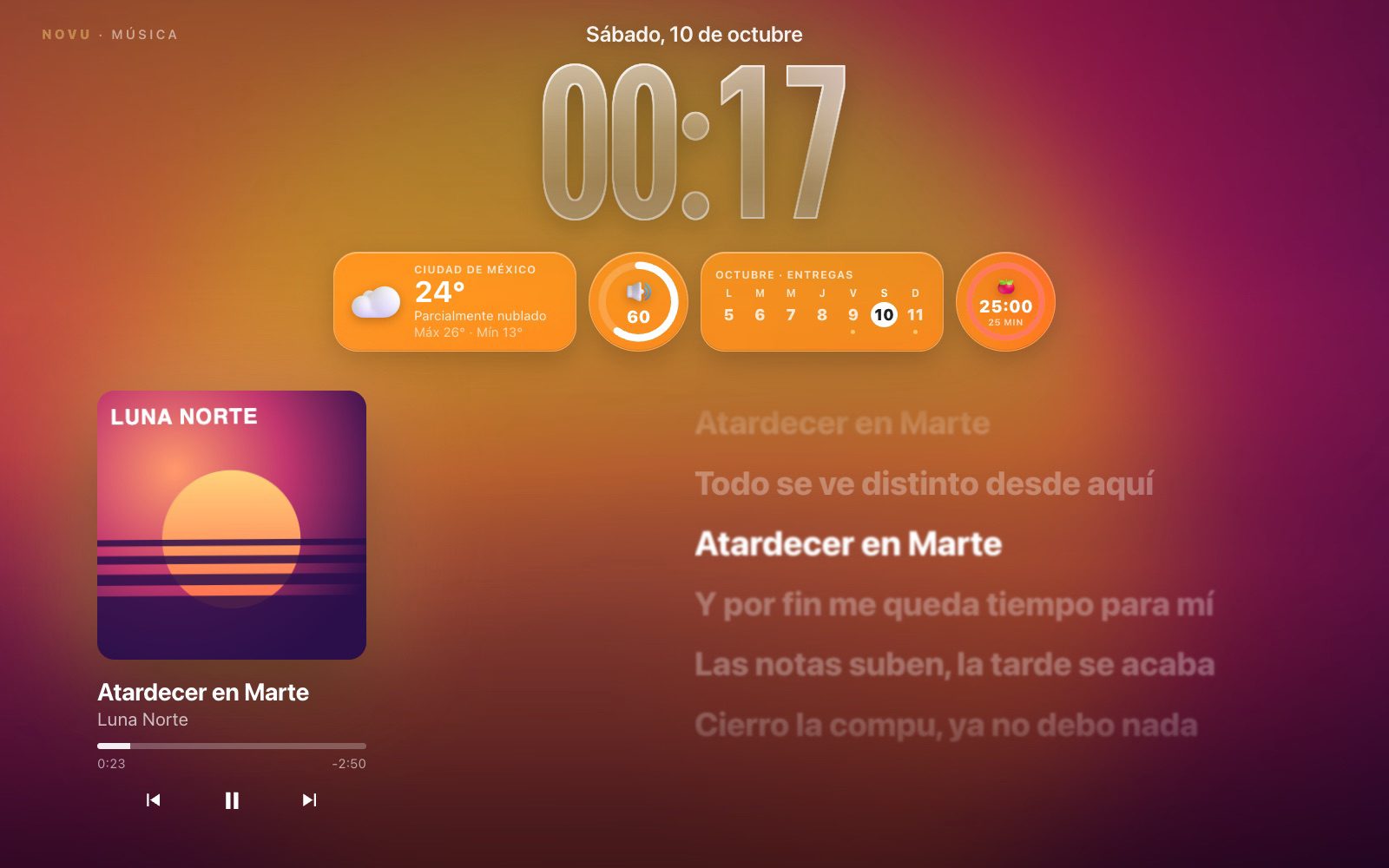
Music with lyrics, and Relax mode. Play a song and the cover art comes alive. Tap to fly through your covers.
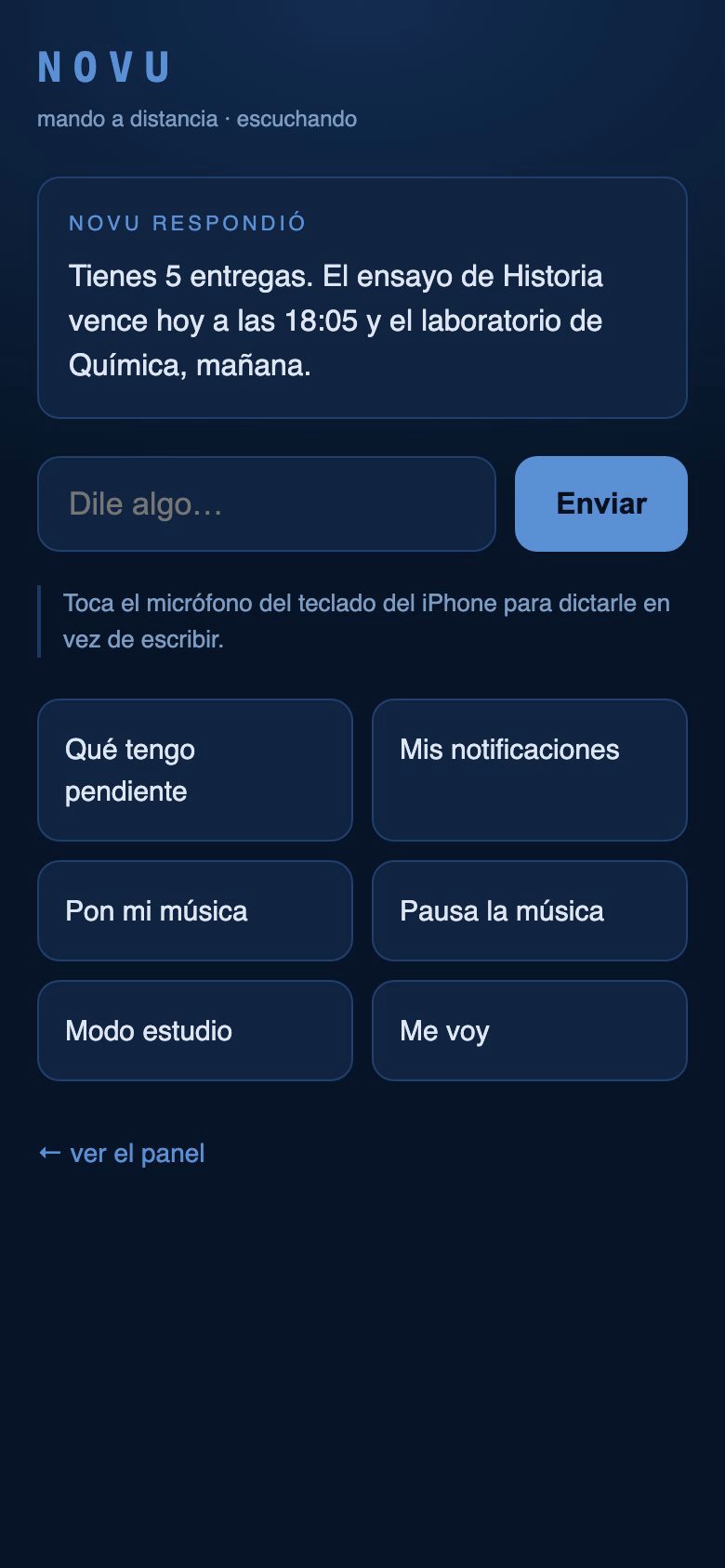
On your iPad and iPhone, from Safari. No App Store. Same plan, same flashcards.

Meet Novito, the monkey on the island. When you talk, he swings down on his vine. He listens, thinks and celebrates when a task is done.
Your voice is processed on your Mac. It only listens after “Hey Novu,” and the audio never leaves your Mac.
Novu on your Mac
Open your Mac.
Novu’s already up.
SCROLL SLOWLY
Your Mac, with someone in your corner.
Say “Hey Novu” and it answers. Here’s what it does.
01 / 04
It knows what’s due before you do.
It pulls in Canvas, Classroom, Moodle and more, and gives you a heads-up 24 and 2 hours before.
02 / 04
It records the lecture and tells you what’s on the test.
You get the summary, the homework your teacher gave and flashcards to review.
03 / 04
It quizzes you out loud.
It asks, listens to your answer and corrects you on the spot.
04 / 04
And when it’s time to study, Relax mode.
Full-screen music, Do Not Disturb and a big clock.
“Test tomorrow” mode
Study by answering,
not rereading.
Tell it you have a test tomorrow and it asks how much time you have. It makes flashcards from your notes and plans your night in your calendar, bedtime included. Then it reads you a question, you answer out loud and it tells you if you got it right. The ones you miss come back.
You“Hey Novu, tengo examen de cálculo mañana.”Hey Novu, I have a calculus test tomorrow.
You“2x.”
Novu“I made flashcards from your notes and planned your night in Calendar. First one: what’s the derivative of x²?”
Novu“Nice. Here’s the second one.”
Novu talks in Spanish. We translated its answers here.
89voice commands
6school platforms
2 monthsfree to try, no card
Before and after
Same Mac.
Fewer steps.
What you do by hand today, Novu does while you study.
BeforeYou screenshot the problem, open another tab, paste it in and wait.
With Novu
Control + Option + P
The island looks at your screen and gives you the answer, with the steps below. No talking, nothing to open.
The island needs macOS 14 or later.
BeforeYou check Canvas, then Classroom, then Moodle to see what’s due this week.
With Novu
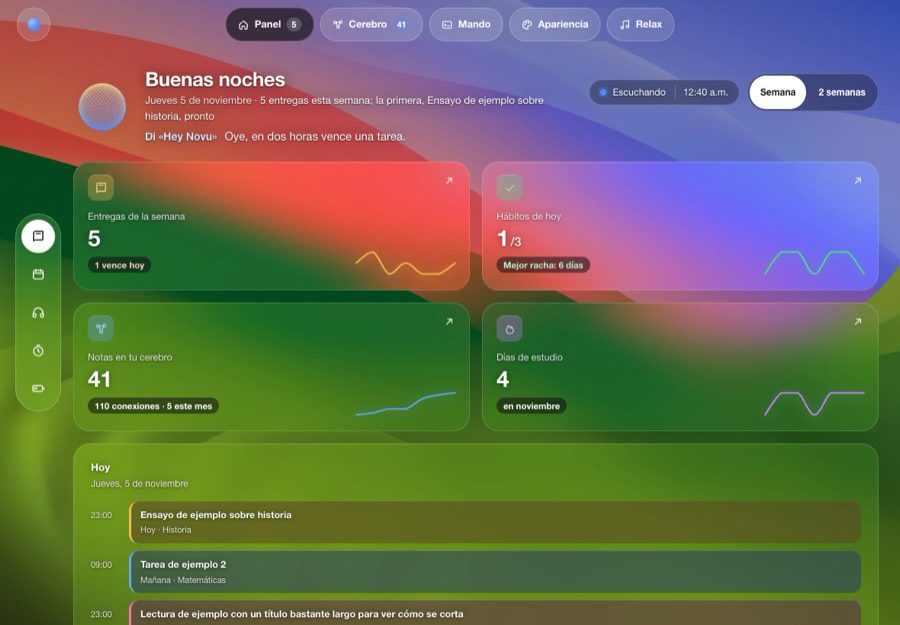
Every deadline, in one dashboard.
Sorted by date, with the class. And a heads-up 24 and 2 hours before each one.
BeforeMusic in another window, on top of your notes, with notifications cutting in.
With Novu
Relax mode.
Your music full screen with lyrics, a big clock, this week’s deadlines and Do Not Disturb.
What you say
Just talk.
Like this.
Say “Hey Novu,” wait for it to say “Dime” (go ahead) and talk the way you talk. No phrases to memorize. Novu listens and answers in Spanish, so the phrases are in Spanish, with the English below.
- Your deadlines, by date
¿Qué tareas tengo pendientes?
What homework do I have? - It asks and corrects you
Tómame examen de biología
Quiz me on biology - Summary and homework at the end
Graba la clase
Record the lecture - A PDF ready to print
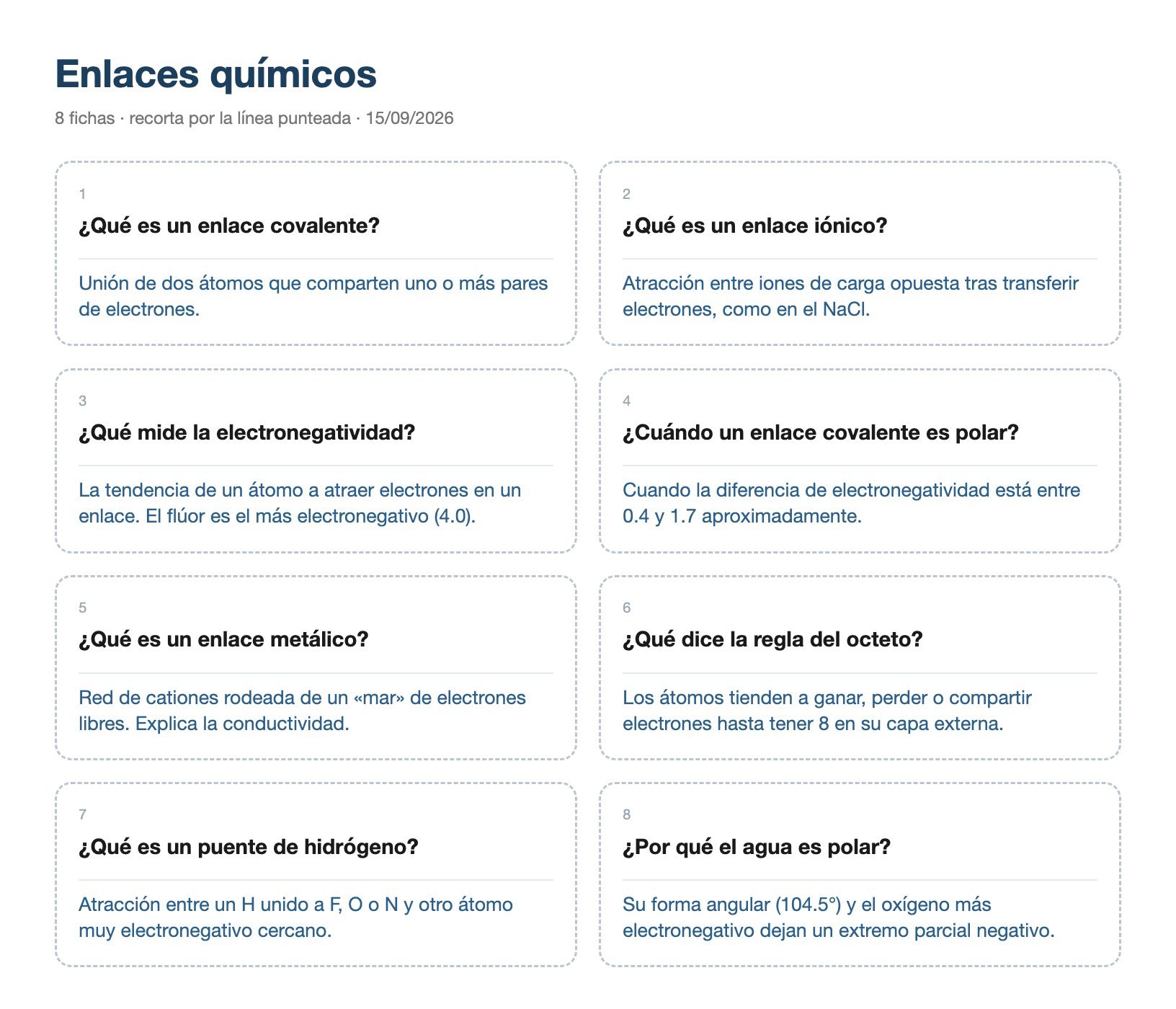
Hazme fichas de historia
Make me history flashcards - PowerPoint with speaker notes
Haz una presentación de la célula
Make a presentation on the cell - Music and Do Not Disturb
Modo relax
Relax mode - In a native voice
¿Cómo se dice gracias en japonés?
How do you say thank you in Japanese? - Your day in a sentence
¿Cómo me fue hoy?
How did today go?
See every command
Your school Canvas · Moodle · Classroom…
- ¿qué tareas tengo pendientes?(what homework do I have?)Two weeks of deadlines, with date and class
- ¿cuándo son mis exámenes?(when are my tests?)Same, for tests
- ¿cuáles son mis materias?(what are my classes?)The classes on your calendar
- mis calificaciones(my grades)Canvas only, with a token
Studying
- tómame examen de biología(quiz me on biology)It asks and corrects you out loud
- hazme fichas para el examen de historia(make me flashcards for my history test)Flashcard PDF to cut out
- ¿qué vimos sobre la fotosíntesis?(what did we cover on photosynthesis?)Searches your notes and cites the source
- indexa mis apuntes(index my notes)Reads your new documents
Lectures
- graba la clase(record the class)Starts recording
- para de grabar(stop recording)Stops and gives you a summary and homework
Making materials
- haz una presentación corta sobre la célula(make a short presentation on the cell)16:9 PowerPoint with speaker notes, 5 styles
- escribe un ensayo sobre el agua(write an essay about water)A Word draft to work from, ~30 s
- haz una infografía del reciclaje para Instagram(make a recycling infographic for Instagram)Poster, square and story sizes
- resume el PDF de descargas(summarize the PDF in Downloads)Spoken summary, also saved
- escribe lo que te dicte(type what I dictate)Talk it out, get a punctuated Word doc
- voy a dictarte el ensayo de historia(I’m going to dictate my history essay)Same, with that title
- termina el dictado(stop dictation)Wraps up and opens the document
Hands mode beta
- modo manos(hands mode)Turns on the camera and hand control
- controla la computadora con la mano(control the computer with my hand)Same thing
- apaga las manos(turn off hands)Turns it off; so does an open palm for 2 s
What is this? beta
- ¿qué es esto?(what is this?)Your Mac recognizes what you show the camera
- ¿qué tengo en la mano?(what am I holding?)Same thing
- descríbelo(describe it)A detailed description
- ¿qué dice?(what does it say?)Reads the text you showed it
Translator 27 languages
- cómo se dice buenos días en japonés(how do you say good morning in Japanese)Says it in a Japanese voice, with pronunciation
- traduce gracias al francés(translate thank you into French)Same thing
- qué idiomas hablas(what languages do you speak)Lists them
English practice
- vamos a practicar inglés(let’s practice English)Conversation with corrections
- practiquemos past simple(let’s practice the past simple)On a specific topic
- stopEnds and tells you what to review
Calls and messages
- llama a Ana(call Ana)Through your iPhone
- hazle FaceTime a Ana(FaceTime Ana)Video call
- mándale un WhatsApp a Ana que ya voy(WhatsApp Ana that I’m on my way)Reads it back before sending
- mándale un iMessage a Ana(send Ana an iMessage)Asks what to say
- lee mis mensajes(read my messages)Messages you received
- crea un contacto Ana López con el 55 1234 5678(create a contact Ana López, 55 1234 5678)Saves the contact
Calculator
- cuánto es el 20 por ciento de 350(what’s 20 percent of 350)70, instantly
- convierte 5 millas a kilómetros(convert 5 miles to kilometers)Unit conversions
- cuántos pesos son 20 dólares(how many pesos is 20 dollars)Today’s exchange rate
Your day
- ¿cómo me fue hoy?(how did today go?)Your day recap and what’s due
- ponme 25 minutos para el ensayo(set 25 minutes for the essay)Timer with an alert
- ¿cuánto falta?(how much time is left?)What’s left on the timer
- toma nota: comprar cartulinas(take a note: buy poster board)Saves it to your second brain
- recuérdame llevar la calculadora(remind me to bring my calculator)Reminder
- qué tengo hoy(what do I have today)Your Mac Calendar
- agenda examen el jueves a las 8(schedule a test Thursday at 8)Event in Calendar
- agrega cartulinas a la lista de compras(add poster board to the shopping list)Reminders lists
- despiértame mañana a las 6:30(wake me up tomorrow at 6:30)Alarm
- qué hora es en Tokio(what time is it in Tokyo)Time in other cities
- ¿tengo notificaciones?(do I have notifications?)Reads them to you
Your Mac
- abre Spotify(open Spotify)Opens or quits apps
- guarda esta sesión(save this session)Remembers your open apps
- abre todo(open everything)Reopens them
- ponle el volumen a 30(set the volume to 30)Volume
- pon el brillo al 40(set brightness to 40)Brightness
- bloquea la pantalla(lock the screen)Locks it
- ve mi pantalla y ayúdame con esto(look at my screen and help me with this)Looks at what you have open
- toma una captura(take a screenshot)Screenshot
- apaga el wifi(turn off Wi-Fi)Wi-Fi, Bluetooth and dark mode
- cómo llego al centro(how do I get downtown)Opens directions in Maps
- busca fotos de la playa(find beach photos)Searches Photos
Music
- reproduce Bad Bunny(play Bad Bunny)Plays that artist on Spotify
- pon la canción Tití me preguntó(play the song Tití me preguntó)That song
- reproduce el álbum Un verano sin ti(play the album Un verano sin ti)That album
- pon mi lista de me gusta(play my liked songs)Plays on Spotify
- pausa la música(pause the music)Pause and resume
- siguiente canción(next song)Skips
- qué canción es esta(what song is this)Tells you
- modo concierto(concert mode)Giant lyrics, with effects that match the song
- ponme música para estudiar(play me study music)Picks from what you already listen to
- canciones para hacer ejercicio(workout songs)Half your artists, half new ones
- ¿qué música me gusta?(what music do I like?)What it’s learned about you over the weeks
Routines
- ya llegué(I’m home)Says hi and opens your apps
- modo estudio(study mode)Low volume and your study apps
- me voy(I’m heading out)Saves, pauses and locks
- ejecuta el atajo concentración(run the focus shortcut)Any macOS Shortcut
Dashboard and look
- abre el panel(open the dashboard)Deadlines and Mac status
- pon el panel en el teléfono(put the dashboard on my phone)QR code for your phone
- ponte en modo minimalista(switch to minimal mode)Changes the theme
- modo relax(relax mode)Your music full screen, with widgets
Second brain and habits
- apunta que el examen de química es el miércoles(note that the chemistry test is Wednesday)Saves it to your Chemistry note
- abre mi cerebro(open my brain)Your linked notes, on a 3D map
- pon mi cerebro en modo galaxia(put my brain in galaxy mode)Changes the map colors
- marca el hábito de leer(check off reading)Ticks it off and tells you your streak
- cómo van mis hábitos(how are my habits going)Which ones you still need today
Conversation
- hablemos(let’s talk)No need to repeat “Hey Novu”
- nada(never mind)If it woke up by accident, it goes quiet
- olvida el tema(drop the topic)Starts fresh
- duérmete(go to sleep)Turns off
No command matches. Ask it anyway: anything that isn’t a command goes to its AI.
For your major
What you’ll use most,
depending on what you study.
- Medicine
Hazme fichas de anatomía
Make me anatomy flashcardsFlashcards from your notes in a PDF to cut out. Then say “tómame examen” (quiz me) and it asks you out loud.
Included in Plus - Law
Resume el PDF que tengo en Descargas
Summarize the PDF in my DownloadsIt tells you what the reading is about and saves the key points. For the week’s long readings.
Included in Plus - Engineering
Control + Option + P
Hover over the problem and the answer shows up on the island, with the steps below. No talking.
On every plan, Free included - Design
¿Qué entrego hoy?
What’s due today?It gathers what’s due from Canvas, Moodle or Classroom. For when you have five projects going at once.
On every plan, Free included - Psychology
Graba la clase
Record the lectureWhen class ends, you get the topic, the summary, the key points and the homework your teacher gave.
Included in Plus - Business
Haz una presentación del análisis FODA
Make a presentation of the SWOT analysisA PowerPoint with speaker notes, as a starting point. The ideas and the words are yours.
Included in Pro
Take a closer look.
Everything on one screen. Say “pon el tema bosque” (switch to the Forest theme) and it changes instantly.


Navy

Privacy
Your voice stays
on your Mac.
It only listens after you say “Hey Novu.” Your voice is transcribed on your Mac, and the audio never leaves it.
Only after “Hey Novu.”
Until then, it isn’t listening. Wait for the “Dime” and talk normally.
Your questions aren’t stored.
Novu’s server only counts how many questions you used, your plan and a fingerprint of your Mac for the free trial.
The camera, only when you use it.
For “¿qué es esto?” (what is this?) or hands mode. The photo is deleted as soon as Novu answers.
Download it free
Ready in
a few minutes.
2 months free, no card. Mac with macOS 13 or later.
- 1
Paste one line into Terminal
Press ⌘ + Space, type “Terminal,” paste this and hit Return.
curl -fsSL https://www.novuai.mx/instalar | bash - 2
Answer a few questions
Double-click “2-Configurar” (set up): your name, your school and your voice.
- 3
Allow the microphone
Open “3-Encender” (turn on) and click Allow.
- 4
Say “Hey Novu”
And ask what homework you have.
On a new Mac, it will ask for Apple’s “command line developer tools.” Click Install and wait. To update, paste the same line.
On your phone or iPad? Novu for Mac installs from your Mac. Send yourself this link and open it there. On iPad, you can start using it right now.
Link copied. Paste it into WhatsApp or an email to yourself.
Choose your plan.
Start free. Pay only if you use it. Your plan works on your iPad and iPhone too.
Free
To see if Novu is for you.
$0
2 months of everything, no card.
Then you stay on Free.
- 10 AI questions a day
- “¿Qué entrego hoy?” (what’s due today?) from your school
- Translator and English practice
- Novito, the monkey on the island
- Mac commands
Recommended
Plus
For using it every day of the semester.
$1,999MXN/year
About $167 a month. You save $989.
Buy Plus- 50 AI questions a day
- 20 min of calls a month: it phones you and quizzes you
- Your whole school: deadlines, classes and grades
- “Test tomorrow” mode
- Dictation, lecture recording and 5 flashcard sets a week
- Spotify by name, and WhatsApp
Pro
For people who want it all.
$3,499MXN/year
About $292 a month. You save $1,289.
Buy Pro- Everything in Plus
- 200 questions a day and a smarter AI
- 60 min of Novu calls a month
- Unlimited flashcards and summaries
- Presentations and infographics
- “What is this?” and hands mode
Prices in Mexican pesos (MXN). Plus is about US$13 a month or US$108 a year; Pro, about US$22 or US$189. Your plan works on your iPad and iPhone too. Yearly is a single payment, doesn’t auto-renew and comes with a 7-day refund window.
Before you decide
What almost everyone asks.
Is it free?
Yes, you can use it for free. For the first 2 months you get everything, no card needed. After that you stay on the Free plan, which never expires: 10 AI questions a day, “¿qué entrego hoy?” (what’s due today?) from your school, the translator and English practice, Novito and your Mac commands.
Want more? There are two paid plans. Plus, $249 MXN a month or $1,999 MXN a year: 50 questions a day, 20 minutes of calls a month, your whole school, “test tomorrow” mode, dictation, lecture recording, 5 flashcard sets a week, Spotify by name and WhatsApp. Pro, $399 MXN a month or $3,499 MXN a year: everything in Plus, 200 questions a day with a smarter AI, 60 minutes of calls a month, unlimited flashcards and summaries, presentations, infographics, “what is this?” and hands mode. See the plans.
Does Novu speak English?
Not yet. Novu listens and answers in Spanish, so you talk to it in Spanish (the commands on this page show the English below each one). What it does do in English is practice with you: say “vamos a practicar inglés” (let’s practice English) and it chats with you in English and corrects you. It also translates into 27 languages.
Will it work on my computer?
If you have a Mac with macOS 13 or later, yes. It doesn’t run on Windows or Linux. Check the requirements before you buy.
What does it cost in total? Anything else to pay?
Nothing else. The free trial lasts 2 months and doesn’t ask for a card. After that, Plus is $249 MXN a month or $1,999 MXN a year, and Pro is $399 MXN a month or $3,499 MXN a year. Monthly, you can cancel anytime; yearly is one payment for 12 months that doesn’t auto-renew. You don’t need any other account or subscription: Novu comes with its own AI.
Over a year: $1,999 MXN with Plus yearly or $3,499 MXN with Pro yearly (monthly it would be $2,988 and $4,788). Paying yearly saves you $989 MXN on Plus and $1,289 MXN on Pro.
Does it work on iPad? What about iPhone?
On iPad, yes. Go to novuai.mx/ipad in Safari and add it to your Home Screen. It works like any other app, no App Store. Talk or type to it, make flashcards (from a photo or PDF too), get quizzed out loud, record your class and connect your Canvas. On iPhone too: go to novuai.mx/iphone. With Back Tap, you open it by double-tapping the back of your phone.
Do I need a Mac to use it on iPad?
No. Without a Mac, you start the free trial on the iPad, no card. If you already have Novu on your Mac, say “Novu, conecta mi iPad” (connect my iPad). It gives you a six-letter code, you type it on the iPad, and it uses your same plan and flashcards. If someone gifted you Novu, paste your NOVU-… key and you’re set.
Does it work offline?
Partly. On the Mac, Mac commands (apps, volume, alarms) keep working offline; answering questions and making materials need internet. On the iPad, your flashcards stay saved so you can study them anywhere.
Do I need Claude?
No. If you already pay for Claude Pro, connect it by saying “conecta mi Claude” (connect my Claude). Novu answers with it, searches the web, and your questions are unlimited on any plan. If you don’t have it, Novu uses its own AI up to your plan’s limit.
What happens if I cancel, or my year ends?
If you pay monthly, you keep your plan until the end of the month you paid for. If you paid for a year, you keep it for the full 12 months and you’re not charged again. Then Novu doesn’t stop: it moves to the Free plan (10 questions a day plus your Mac commands). The free trial is once per Mac, so it doesn’t restart. Your data and settings stay on your Mac, and if you pay again, it picks up where you left off.
I bought lifetime Pro. Do I lose it?
No. Lifetime Pro is no longer sold, but if you bought it, you keep it forever: everything in Pro, no subscription, nothing more to pay. It includes 60 minutes of Novu calls a year.
What happens when the 2 free months end?
Novu gives you a week’s notice. When it ends, it drops to the Free plan and keeps working: Mac commands, 10 AI questions a day and “¿qué entrego hoy?” (what’s due today?). Want more? Activate Plus or Pro. Reinstalling doesn’t restart the trial: it counts per Mac, not per install.
Is my school supported?
If it uses Canvas, Moodle, Google Classroom, Blackboard, Schoology or Brightspace, yes. It connects through the calendar link. Microsoft Teams isn’t supported.
Is it hard to install?
You paste one line into Terminal and the installer does the rest in six steps. Then a setup assistant asks you nine questions, all with double-clicks. No coding required.
Is it listening to everything I say?
No. It only wakes up when you say “Hey Novu”, and your voice is transcribed on your Mac. The only things that go online are the text of what you ask, a screenshot when you ask it to look at your screen, a photo when you ask it to describe something, and, if you play music, the song title and artist to look up lyrics (you can turn that off). When you ask for music recommendations, it sends a summary of the artists you play most: names only, no dates or times. And when you dictate, the dictated text goes out to get punctuated; your voice is transcribed first, on your Mac.
All of that is answered by Novu’s AI, on Novu’s server using OpenAI, or by your own Claude if you connected it. Novu’s server doesn’t store what you ask. It only counts how many questions you used each day, which plan you’re on, and a fingerprint of your Mac for the free trial. The fingerprint is a code calculated on your Mac; its serial number never leaves it.
Is the camera watching me?
Only in two cases: while hands mode is on (the green light comes on and the island shows a hand), and when you ask “¿qué es esto?” (what is this?), which takes a single photo. In both cases the image is analyzed on your Mac. The photo only goes online if you say “descríbelo” (describe it) or “¿qué dice?” (what does it say?), and it’s deleted as soon as Novu answers.
Is it going to do my kid’s homework?
No. Novu isn’t built to turn things in for you. It doesn’t do your homework, your projects or your tests. It helps you understand them. It explains what the assignment is asking, builds an outline (how to structure it and what to research), finds what you already covered in your notes, and quizzes you out loud so you show up ready.
When it drafts something or builds slides, that’s your starting point, not your submission. The content, arguments and words you turn in are still yours. If it didn’t go through your head, you didn’t learn it, and it shows on the test.
My parents are paying. What do I tell them?
That you can try it free for 2 months, no card, before they pay a thing. That it’s hooked up to your school calendar and reminds you about deadlines before they’re due. That your voice is processed on the Mac, not online. And that there are two plans: Plus, $249 MXN a month or $1,999 MXN a year, and Pro, $399 MXN a month or $3,499 MXN a year. Monthly can be canceled anytime; yearly is a single payment, by card or at OXXO, that doesn’t auto-renew and saves $989 MXN on Plus or $1,289 MXN on Pro compared to paying monthly.
What if it doesn’t work for me?
That’s what the 2-month trial is for: install it and try it on your Mac before you pay. If you buy Plus or Pro and something breaks, you get support by message to get it running. If you paid for a year, you also get 7 days to request a refund.
How do I uninstall it?
Double-click “8-Desinstalar-Novu” (uninstall) in the Novu folder and click Desinstalar (Uninstall). It shuts Novu down, removes it from startup, deletes its voice models and moves the folder to the Trash. You can also paste this into Terminal: curl -fsSL https://www.novuai.mx/desinstalar | bash. If you pay monthly, cancel your subscription too: deleting Novu doesn’t stop the charges.
More questions? Check the help center or message us on WhatsApp.
Study out loud
Your next deadline is already on your calendar.
Let Novu remind you, help you get ready and quiz you before it’s due. All you do is talk.
2 months free, no card · macOS 13 or later · Yearly saves up to $1,289 MXN